Sponsored Links

Hordes.io

Dive into this epic io game and prepare yourself for a series of relentless battles. These block\u002Dshaped warriors are declaring war on one another. Use spells and weapons to survive for as long as possible.

Read More Read More

Hordes.io

Press 【Esc】 to Exit Fullscreen
Sponsored Links

Hordes.io

Dive into this epic io game and prepare yourself for a series of relentless battles. These block\u002Dshaped warriors are declaring war on one another. Use spells and weapons to survive for as long as possible.
Play Now
To play the game, you need to allow Adobe Flash Player to run in your browser.

You can use UGameZone Flash Enabler plugin to enable Flash automatically. Or you can follow our instructions to enable Flash manually.

Play Automatically
Sponsored Links
Step 1
Step 2
Please enable Adobe Flash Player to play "Hordes.io"

Enable Flash in Chrome settings. When Flash is disabled, the label will read " Block sites from running Flash ".Click the toggle to enable flash and the label will read " Ask First ". Shown like the following:
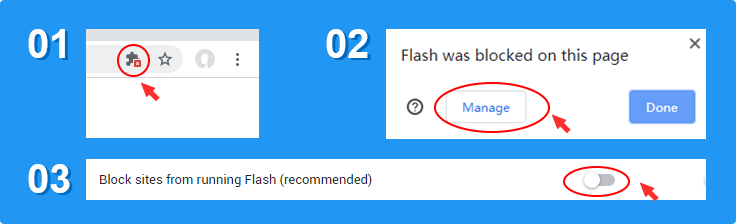
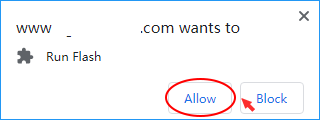
Now Click And then,click " Allow " in the box that appears in the top-left to play the game.Shown like the following: